
matesx
Fan Favourite
- Joined
- Mar 22, 2011
- Messages
- 4,437
- Reaction score
- 4,120
the "must already be in your network" was the confusing bit


Follow along with the video below to see how to install our site as a web app on your home screen.
Note: This feature may not be available in some browsers.

Yeah, they wording says must already begin your network, wasn't sure if that means as of now or before nominating themYou can add them easily.


I can forward a ticket for the Brighton game, but not any others.Has anyone got anywhere with this? Still not letting me forward tickets to anyone on my network, season ticket holder or not


Ah, thanks for the update.Yes, the option appears. But when I select someone to send it to I get the below and they are not a season ticket holder
View attachment 54988
Are you trying to forward a ticket for the Brighton game?I am on the phone trying speak to someone in the ticket office and have been listening to music for nearly an hour!

Lucky youI managed to sort it at 5pm yesterday
Found it quite easy

Family friend (paid member but non STH) was already in my network, nominated him and forwarded him the ticket and he got home from work at 6pm and accepted and he now has the ticket in his apple walletLucky you
I don't suppose you did anything different to what I am trying, but just on the off chance, please describe what you did?
This should be nailed up on the main ticketing page! Cheers. Feck me I'll train ChatGPT to test the specifications.Not sure if some of the terms are confusing people.
Registered users = have an account at https://www.eticketing.co.uk/ccfc/ and a supporters number. This is free and can be done any time.
Members = registered users that have paid for a membership this season.
Season ticket holders = registered users that have bought a season ticket this season.
Members in your Network = other registered users linked to your account. you can add any registered users any time.
Nominated supporters = members in your network you can nominate 5 of to forward tickets to.
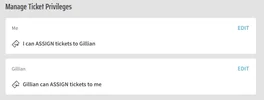
Perhaps Gillian needs to give you permission to MANAGE tickets, rather than just to assign them?The email they get says no further action is needed and the below shows in my network
View attachment 54989

Be careful with this. Even though it says this on the screen, you need to click on the 'I can assign tickets to Gillian' bit and then another screen opens up which shows that you MAY (if you haven't already) need to ask to assign tickets to her (even though the screen shown suggests you already can - confusing, I know) Gillian then needs to log in and approve this, before it can happen. Hope this makes sense (it happened to me, and I was stumped for a while!) Similar to what @paulcalf has suggested.The email they get says no further action is needed and the below shows in my network
View attachment 54989
Did your friend get the invite via email?Family friend (paid member but non STH) was already in my network, nominated him and forwarded him the ticket and he got home from work at 6pm and accepted and he now has the ticket in his apple wallet
He was my only nominee as Sunday is the only game I plan on missing at home, maybe only nominating one person made it a quicker process for me? Who knows


Keeps saying dont have permissionsHas anyone got anywhere with this? Still not letting me forward tickets to anyone on my network, season ticket holder or not
See above procedure. You do not use the Forward to Friend button. It gives the error message you are seeingKeeps saying dont have permissions
Thats just to select who you nominate though. Have you managed to forward a ticket to themFinally sorted from a post on fB.
Sign in, go to 'Nominated Supporters 26-27' under All Event Tickets. Select the match and then Buy now, proceed to basket and checkout, and then you will be asked to assign the ticket for £0 and finish checking out.
View attachment 54993
As to why there is a forward to friend button is beyond me

No it isn't and yes I have. Follow the procedure I posted and all works. Do not click the Forward to Friend button as this does not workThats just to select who you nominate though. Have you managed to forward a ticket to them
Reading up though im guessing its because ove got to wait 24 hours View attachment 54994
Tried and doesnt work , will try on pc laterNo it isn't and yes I have. Follow the procedure I posted and all works. Do not click the Forward to Friend button as this does not work
Thats just to nominate somebody though ?To be fair the official procedure works afterall
No, read steps 7 onwardsThats just to nominate somebody though ?


